

Use Perplexity when you need verified, source-backed answers fast. Use ChatGPT when you need to draft, iterate, code, or teach. The smartest workflow combines both: research in Perplexity, then draft in ChatGPT. Both platforms offer free tiers and paid plans at approximately $20/month, so cost alone rarely decides it.
Quick decision guide:
- Research, fact-checking, or current events? Start with Perplexity. Its citation-first design surfaces inline sources automatically, so you spend less time chasing references.
- Drafting, coding, tutoring, or iterative editing? ChatGPT wins here. GPT-5.4 and GPT-5.3 Instant (available via ChatGPT Plus) handle multi-turn context and complex reasoning better than any search-first tool.
- Both? Run the blended workflow: Perplexity for source discovery, ChatGPT for creation.
Pro Tip: Before you open either tool, write one sentence describing your failure mode. If "I might cite something wrong" is the risk, open Perplexity first. If "my output will be generic" is the risk, open ChatGPT.
Key Takeaways
Perplexity wins on source transparency and real-time research; ChatGPT wins on creative output and multi-step reasoning; the blended workflow combines both for professional-grade results.
| Point | Details |
|---|---|
| Use Perplexity for research | Citation-first design surfaces inline sources automatically, reducing verification work on fact-sensitive tasks. |
| Use ChatGPT for creation | GPT-5.4 and Canvas handle long-form drafting, coding, and iterative editing better than any search-first tool. |
| Blended workflow is the standard | Research in Perplexity, draft in ChatGPT, then verify final claims back in Perplexity before publishing. |
| Privacy requires enterprise plans | Neither consumer plan is HIPAA-suitable; remove all PHI and use enterprise agreements for healthcare workflows. |
| Zensweb for AI visibility | Zensweb's performance-based AI Search Visibility program helps healthcare practices appear on ChatGPT, Perplexity, and Google within 90 days. |
Table of Contents
- How ChatGPT and Perplexity are built differently
- Side-by-side comparison across core dimensions
- When does Perplexity give you the better answer?
- When does ChatGPT give you the better answer?
- What do the free and paid plans actually include?
- How do each platform handle your data?
- What integrations and APIs does each platform support?
- Where do both tools fail, and how do you catch it?
- What does a professional blended workflow actually look like?
- Which tool should you pick for your specific job?
- How Zensweb uses both tools for healthcare marketing
- Your healthcare practice can appear on ChatGPT and Perplexity
- Sources
How ChatGPT and Perplexity are built differently
The core split is architectural. Perplexity is an answer engine: every query triggers a live web search, and the response is built around cited sources. ChatGPT is a conversational assistant: it reasons from training data and, when configured to do so, can search the web, but that is not its default mode or its primary strength.
That design difference cascades into almost every practical outcome you will notice.
What the architecture difference means in practice:
- Web access: Perplexity searches by default on every query. ChatGPT may or may not trigger a search depending on the prompt and plan.
- Citations: Perplexity surfaces inline numbered citations in the response body. ChatGPT typically aggregates sources at the end, if it cites at all, which creates extra verification work.
- Session memory: ChatGPT maintains rich multi-turn context and can reference earlier parts of a long conversation. Perplexity threads are shorter and more query-focused.
- Model sourcing: Perplexity Pro lets you switch between Sonar, Claude Sonnet 4.6, Gemini 3.1 Pro, Nemotron 3, Nemotron 3 Super, and GPT-5.x variants in a single subscription. ChatGPT Plus routes you through OpenAI's own model family (GPT-5.4, GPT-5.3 Instant) with no third-party model switching.
A concrete example: ask both tools "What are the latest FDA guidance updates on telehealth prescribing?" Perplexity returns a structured answer with three to five numbered citations you can click immediately. ChatGPT may give a more polished narrative but will often draw from training data rather than today's Federal Register, and you will need to verify the dates yourself.
Pro Tip: A common trap with ChatGPT is assuming it searched the web when it did not. If the answer includes specific statistics or regulatory details, check whether a source link actually appears. If not, treat the output as a draft, not a fact.
Side-by-side comparison across core dimensions
G2's hands-on testing found Perplexity is stronger for quick, data-heavy research while ChatGPT produces outputs closer to an executive briefing after iterative prompting. The table below maps those findings across the dimensions that matter most for professional use.
| Dimension | ChatGPT (Plus / GPT-5.4) | Perplexity (Pro) |
|---|---|---|
| Best for | Drafting, coding, tutoring, iterative editing | Research, fact-checking, current events, citations |
| Real-time web access | Optional; not triggered by default on all queries | On by default; every query runs a live search |
| Citations & transparency | Aggregated at end, inconsistent inline | Inline numbered citations on every answer |
| Creativity & long-form | Strong; Canvas mode supports document-level editing | Limited; optimized for answers, not drafts |
| Reasoning & coding | GPT-5.4 and GPT-5.3 Instant excel at multi-step code and logic | Adequate for reasoning; not the primary use case |
| Pricing & limits | Free tier; ChatGPT Plus at ~$20/month for GPT-5.x access | Free tier; Perplexity Pro at ~$20/month for multi-model access |
| Customization & API | Custom GPTs, plugin ecosystem, OpenAI API | Model Council (Sonar, Gemini 3.1 Pro, Claude Sonnet 4.6, Nemotron 3), Perplexity API |
| Privacy & data handling | Data used for training by default; enterprise controls available | Similar defaults; Pro plan offers some data controls |
| Platform availability | Web, iOS, Android, Mac app, API | Web, iOS, Android, API; Comet browser agent in rollout |
Where each platform leads by job category:
- Research and sourcing: Perplexity, by design. AI Citation Monitor's analysis notes Perplexity averages multiple inline sources per answer, outpacing most AI overview features on citation frequency.
- Creative and long-form output: ChatGPT, particularly with Canvas and the GPT-5.4 model tier.
- Multi-model flexibility: Perplexity Pro, which lets you run the same query across Sonar, Claude Opus 4.6, Gemini 3.1 Pro, and Nemotron 3 Super in one interface.
- Coding and debugging: ChatGPT, where GPT-5.3 Instant handles high-volume, lower-latency code tasks and GPT-5.4 handles complex multi-step logic.
When does Perplexity give you the better answer?
Perplexity is the right first tool when you cannot afford to cite something wrong. That covers more professional situations than most people initially assume.
Use Perplexity for:
- Breaking news and current events where training-data cutoffs make ChatGPT unreliable
- Academic and literature searches where you need traceable sources, not synthesized summaries
- Regulatory and policy fact-checking (FDA updates, CMS rule changes, state licensing boards)
- Competitive intelligence briefs where you need recent data points with links
- Pulling premium sources via Perplexity Pro's access to paywalled datasets
Three prompt templates you can reuse:
- "Summarize the most recent peer-reviewed findings on [topic] published after January 2025. List each source inline."
- "What changed in [regulation/policy] between 2024 and today? Cite the primary government source for each change."
- "Find three credible sources that either support or contradict the claim that [specific claim]. Show the source URL for each."
Pro Tip: Use Perplexity's Focus modes. The Academic focus restricts results to scholarly sources; the Writing focus pulls from editorial content. Switching modes on the same query often surfaces entirely different source sets, which is a fast way to stress-test a claim.
Where Perplexity falls short: it is not built for iterative document editing, long creative drafts, or code generation. If you paste in a 2,000-word draft and ask for a structural revision, you will get a summary, not a rewrite. That is when you move to ChatGPT.
When does ChatGPT give you the better answer?
ChatGPT is the right tool when the quality of the output itself is what matters, not just the accuracy of the underlying facts. Coursera's analysis highlights ChatGPT's tutoring modes and stepwise explanation capabilities as genuinely differentiated from anything Perplexity offers.
Use ChatGPT for:
- Long-form drafting where you need structure, voice, and iterative revision in one session
- Canvas-based document editing for side-by-side drafting and inline revision
- Coding and debugging across languages, with GPT-5.4 handling complex logic and GPT-5.3 Instant handling high-volume routine queries
- Tutoring and stepwise learning where the model walks through reasoning rather than just returning an answer
- Custom GPTs configured for specific workflows (a brand voice GPT, a code review GPT, a patient communication GPT)
Three prompt templates for iteration:
- "Here is a rough draft of [document type]. Rewrite the opening paragraph to lead with the core claim, then flag any section where the logic is unclear."
- "Write a Python function that does [task]. Then explain each line as if I am a mid-level developer who has not used this library before."
- "I am trying to understand [concept]. Start with a one-sentence definition, then give me a concrete example, then tell me the most common misconception about it."
When to switch back to Perplexity: after drafting, run any specific statistics, named studies, or regulatory claims through Perplexity to verify the source exists and says what you think it says.
Pro Tip: ChatGPT's Canvas mode is underused for professional documents. Open Canvas, paste your draft, and ask for a "structural edit only, no rewriting of voice." You get a reorganized document without losing your tone, which is faster than a full rewrite prompt.
What do the free and paid plans actually include?
Both platforms offer free tiers and premium plans priced at approximately $20/month, so the headline price is identical. The difference is what each paid tier unlocks.
ChatGPT Plus (~$20/month):
- Access to GPT-5.4 and GPT-5.3 Instant via OpenAI's model release cadence
- Canvas document editing mode
- Custom GPTs and the GPT Store
- Persistent memory across sessions
- Higher message limits than the free tier
- Advanced Data Analysis (code interpreter, file uploads)
Perplexity Pro (~$20/month):
- Multi-model access: Sonar, Claude Sonnet 4.6, Claude Opus 4.6, Gemini 3.1 Pro, Nemotron 3, Nemotron 3 Super, GPT-5.x variants
- Higher Pro Search query limits per day
- Access to premium data sources
- File upload and analysis
- Perplexity API access at higher rate limits
Free tier limits to know:
- ChatGPT free: access to GPT-4o with lower message caps; no Canvas, no memory, no custom GPTs
- Perplexity free: limited Pro Search queries per day; standard model only (Sonar)
For heavy users, both platforms offer higher-tier plans above $20/month. OpenAI's Pro plan (separate from ChatGPT Plus) and Perplexity's enterprise options carry higher caps and additional controls. Student and education pricing exists for both but varies by institution.
How do each platform handle your data?
Both platforms collect conversation data by default and may use it to improve their models. Neither is HIPAA-compliant out of the box for consumer plans. That matters significantly if you work in healthcare.
Key privacy checkpoints:
- Data retention: Both platforms retain conversation history unless you delete it manually or disable history in settings.
- Model training opt-out: ChatGPT allows you to turn off training data use in Settings > Data Controls. Perplexity has similar controls in account settings.
- Enterprise controls: OpenAI's enterprise API and ChatGPT Enterprise offer data processing agreements and no training on customer data. Perplexity's enterprise tier offers comparable controls.
- HIPAA suitability: Neither consumer plan is suitable for protected health information (PHI). Enterprise agreements with a Business Associate Agreement (BAA) are required for any HIPAA-adjacent use.
Privacy checklist before uploading sensitive content:
- Confirm you are on an enterprise or API plan with a signed data processing agreement.
- Remove all patient names, dates of birth, and identifiers before pasting any clinical content.
- Disable conversation history for the session if your plan allows it.
- Never paste full medical records, insurance IDs, or SSNs into any AI chat interface.
- Treat AI-generated content involving clinical claims as a draft requiring human review before publication or patient communication.
For a deeper look at HIPAA-compliant AI use in healthcare marketing, the compliance considerations extend well beyond which tool you choose.
Pro Tip: If you are using either platform for healthcare content, create a "sanitized brief" template: a structured prompt that contains only de-identified, publicly available information. Run all AI sessions from that template, never from raw patient data or internal records.
What integrations and APIs does each platform support?
Perplexity's integration strengths center on multi-model orchestration. Perplexity Pro's Model Council lets you run the same query across Sonar, Claude Sonnet 4.6, Gemini 3.1 Pro, Nemotron 3, and Nemotron 3 Super in a single interface, then compare outputs side by side. Zapier's testing documents Perplexity Computer (a browser agent for web-based tasks) and notes the Comet browser agent as an emerging capability for multi-step web automation.
ChatGPT's integration strengths center on the custom GPT ecosystem and the OpenAI API. Custom GPTs let you embed specific instructions, knowledge files, and tool connections into a persistent assistant. The plugin ecosystem (now largely replaced by GPT actions) connects to external services. ChatGPT's Agent Mode handles multi-step tasks autonomously within a session.
Common integrations for professional workflows:
- Zapier: Both platforms connect to Zapier for automation hooks (trigger a Perplexity search from a form submission; push ChatGPT output to a CMS).
- API access: OpenAI's API gives developers access to GPT-5.4 and GPT-5.3 Instant with separate billing from ChatGPT Plus. Perplexity's API exposes Sonar and other models with per-token pricing.
- Enterprise controls: Both offer SSO, audit logs, and data residency options at enterprise tiers.
One practical use case for multi-model access: run a research query through Sonar (fast, economical), then run the same query through Claude Opus 4.6 (safety-tuned, conservative) and compare where the answers diverge. Divergence points are exactly where you need a primary source.
Reuters reported in early 2026 that personnel and ecosystem shifts at OpenAI continue to accelerate model and platform development, which means the integration landscape for both platforms will keep changing through the year.
Where do both tools fail, and how do you catch it?
Both platforms hallucinate. The difference is how the failure mode presents itself.
ChatGPT's common failure modes:
- Confident, well-written answers that cite studies or statistics that do not exist
- Outdated regulatory or clinical information presented as current
- Code that runs but produces wrong outputs on edge cases
- Web search not triggering when the user expects current data
Perplexity's common failure modes:
- Citations that link to a real page but misrepresent what that page actually says
- Aggregating conflicting sources without flagging the conflict
- Weaker performance on creative or multi-step reasoning tasks
- Premium source access that still misses paywalled primary documents
Verification checklist for high-stakes outputs:
- Click every citation link and confirm the source says what the response claims.
- For any statistic, find the original study, not a secondary summary.
- Run the same factual question through a second model (use Perplexity's Model Council or compare ChatGPT and Perplexity directly).
- For code, run it in a sandboxed environment before deploying.
- For regulatory or clinical claims, check the primary government or professional body source.
- Date-stamp your research session: AI outputs can become stale within weeks on fast-moving topics.
Pro Tip: When speed and verification conflict, use a two-pass approach. First pass: Perplexity for a fast answer with citations. Second pass: click the two most important citations and confirm they support the claim. This takes three minutes and catches most errors before they propagate into a draft.
What does a professional blended workflow actually look like?
The most reliable professional workflow treats Perplexity and ChatGPT as sequential tools, not competitors. G2's testing and Zapier's roundup both point toward this pattern for knowledge workers who need both accuracy and quality output.
Step-by-step blended workflow:
-
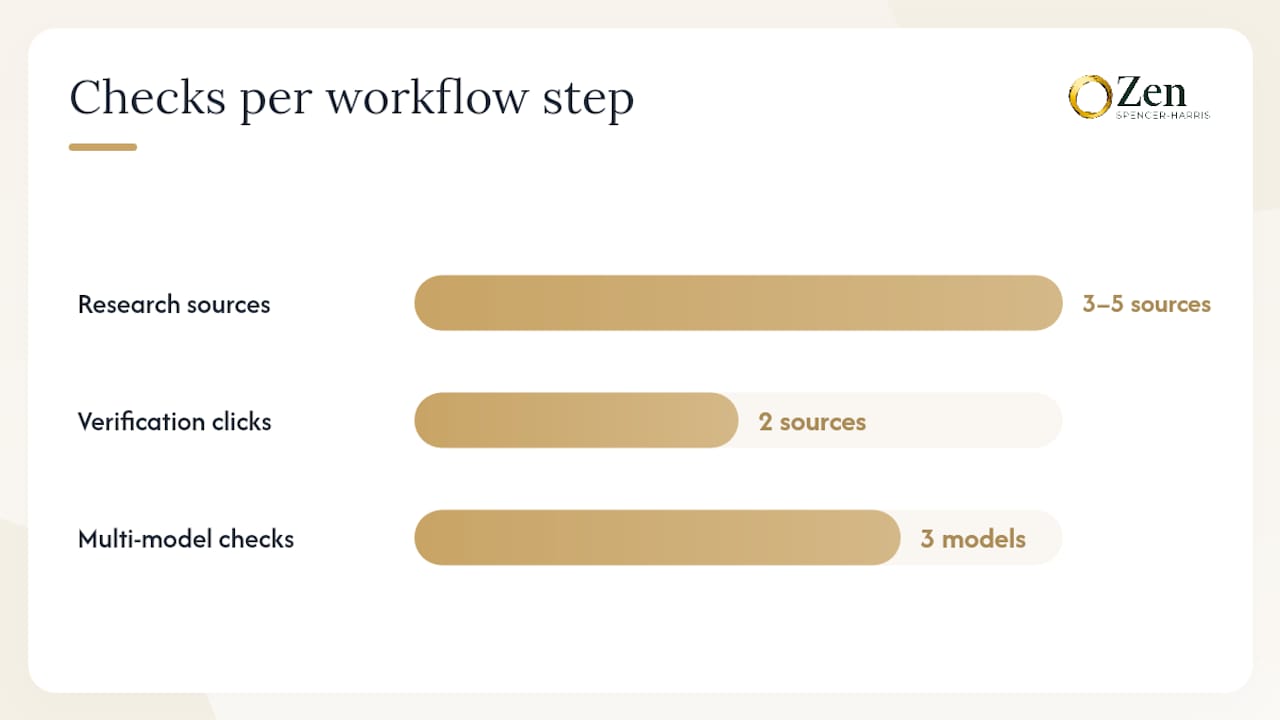
Research phase (Perplexity): Run your core research query with a Focus mode set to Academic or Web. Collect the three to five most credible cited sources. Prompt: "Summarize the current evidence on [topic]. List each source inline with a URL."
-
Verification pass (Perplexity or primary source): Click the top two citations. Confirm the source says what the summary claims. Note any conflicting data points.
-
Drafting brief (ChatGPT): Paste your verified source list and key findings into ChatGPT. Prompt: "Using only the facts in this source list, draft a [document type] for [audience]. Do not add claims not supported by the sources I provided."
-
Iteration and refinement (ChatGPT Canvas): Use Canvas to restructure, tighten, or adjust tone. Prompt: "Revise this draft for a [specific audience]. Tighten the opening paragraph and flag any section where the logic is unclear."
-
Final fact-check (Perplexity): Paste any statistics or regulatory claims from the final draft back into Perplexity. Prompt: "Verify that the following claims are accurate and current. Cite the primary source for each."
When to run a multi-model check: For high-stakes outputs (clinical content, legal summaries, financial analysis), run step 2 across Sonar, Claude Sonnet 4.6, and Gemini 3.1 Pro using Perplexity Pro's Model Council. Where two models agree and one diverges, investigate the divergence before publishing.
Pro Tip: Save your verified source list as a ChatGPT Custom GPT knowledge file. Every future draft in that topic area starts from a pre-verified source base, which cuts the research phase from 20 minutes to two.
Which tool should you pick for your specific job?
| Job to be done | First choice | Fallback / complement | Use blended workflow? |
|---|---|---|---|
| Research & fact-checking | Perplexity | ChatGPT for synthesis | Yes, always |
| Creative long-form drafting | ChatGPT | Perplexity for source verification | Yes, for factual claims |
| Coding & debugging | ChatGPT (GPT-5.4) | Perplexity for documentation lookup | Optional |
| Tutoring & stepwise learning | ChatGPT | Perplexity for current examples | Optional |
| Multi-step automation | ChatGPT Agent Mode | Perplexity Computer / Comet | Depends on task |
One-line recommendations:
- Research/fact-check: Open Perplexity, set Focus to Academic, and collect citations before you write a single word.
- Creative long-form: Open ChatGPT with Canvas, paste your Perplexity source list, and draft from verified facts.
- Coding/debugging: ChatGPT with GPT-5.4 for complex logic; GPT-5.3 Instant for high-volume routine queries.
- Tutoring/learning: ChatGPT's stepwise explanation modes, with Perplexity for pulling the most current examples or studies.
- Multi-step automation: ChatGPT Agent Mode for internal workflow tasks; Perplexity Computer or Comet for web-based research automation.
Rule of thumb: If the output needs a source, start in Perplexity. If the output needs a voice, start in ChatGPT.
How Zensweb uses both tools for healthcare marketing
At Zensweb, the blended workflow is not theoretical. Perplexity handles source discovery for healthcare content: pulling current CMS guidance, recent clinical studies, and regulatory updates with inline citations that the team can verify before any content goes near a client. ChatGPT handles the drafting and iterative messaging, where GPT-5.4's multi-turn context lets us refine patient-facing copy across multiple rounds without losing the thread.
The reason this matters for healthcare clients specifically: a hallucinated statistic in a patient acquisition campaign is not just a quality problem, it is a compliance risk. The two-tool workflow builds a verification gate into the process rather than treating accuracy as an afterthought.
For community health centers and specialty practices, this workflow connects directly to measurable outcomes. The FQHC marketing work Zensweb has done shows that AI-assisted content, when grounded in verified sources, drives meaningful visibility gains on both traditional search and AI answer engines. That visibility is what converts into booked appointments.
Your healthcare practice can appear on ChatGPT and Perplexity
Most specialty practices are invisible on AI answer engines right now. When a patient asks ChatGPT or Perplexity "who is the best psychiatrist near me" or "where can I find a behavioral health clinic that accepts Medicaid," the practices that appear are the ones that have been optimized for AI search, not just Google.
Zensweb's AI Search Visibility program is built around exactly the workflow described in this article: verified, authoritative content structured so that ChatGPT, Perplexity, Claude, and Google surface your practice in their answers. The program is performance-based, meaning you pay for booked appointments, not for activity. If you want to know where your practice stands today, a free healthcare visibility audit shows you exactly which AI platforms are and are not citing you, and what it would take to change that within 90 days.
Sources
- Model release notes — OpenAI Help Center
- Perplexity vs ChatGPT — Coursera
- Perplexity vs ChatGPT: Which AI tool is better? — Zapier
- I Tested Perplexity vs. ChatGPT: Which Is Better in 2026? — G2 Learning