

Use IndividualPhysician for a clinician's own profile page, and reserve Physician for pages that represent the practice or office as a medical business entity. That distinction matters because Google and AI assistants like ChatGPT and Perplexity read these types differently: one describes a person, the other describes an organization that happens to be a medical business.
Before you touch nested properties or hospital affiliations, get the floor right. Every physician page needs:
nameandmedicalSpecialtyset to the actual clinical specialty, not a marketing label- A stable identifier, ideally
usNPI, so the entity resolves cleanly across search and AI systems - A
telephoneand linked practice or organization entity for contact and location
Drop this into a <script type="application/ld+json"> block in the page head, validate it (more on tools below), and you already outperform most competitor pages that carry no structured data at all.
Key Takeaways
Physician schema works best when clinicians use IndividualPhysician linked to a MedicalOrganization through practicesAt and hospitalAffiliation rather than isolated, unlinked profile fields.
| Point | Details |
|---|---|
| Choose the right type | Use IndividualPhysician for clinician bios and Physician for practice-level pages. |
| Hit the property floor | Add name, medicalSpecialty, usNPI, and contact details before anything else. |
| Link the entity graph | Connect physician to practice and hospital via practicesAt and hospitalAffiliation for stronger retrieval. |
| Validate before and after deploy | Use validator.schema.org, Google's Rich Results Test, and Search Console's Enhancements report. |
| Consider a managed partner | Zensweb's performance-based model suits growing practices that need ongoing schema monitoring tied to booked appointments. |
Table of Contents
- Physician Schema vs Doctor Schema Markup: Picking the Right Type
- Core Properties Every Physician Page Should Include
- Copy-Ready JSON-LD: Minimal and Advanced Physician Examples
- When Should You Add MedicalWebPage Markup?
- How Do You Test and Validate Physician Structured Data?
- How Do Physician Rich Results Evolve Over Time?
- Best Practices to Avoid Common Physician Schema Mistakes
- Implementation Checklist and Review Cadence
- Using Case Proofs and Author Credentials to Justify the Work
- What Actually Moves the Needle With Physician Schema
- A Managed Path to Physician Schema at Scale
- Sources
Physician Schema vs Doctor Schema Markup: Picking the Right Type
"Physician schema" and "doctor schema markup" describe the same corner of Schema.org's vocabulary, but the type names underneath aren't interchangeable. Physician sits under the hierarchy Thing > Organization > LocalBusiness > MedicalBusiness > Physician, which means it inherits organization-style properties. It's built to describe a physician's office as a business entity, not the human being who runs it.
IndividualPhysician is the type built for the person. It carries practicesAt, hospitalAffiliation, availableService, and medicalSpecialty, and it's designed to point at an organization rather than pretend to be one. If you're marking up a doctor's bio page on a group practice site, IndividualPhysician is almost always the right call.
Here's how the use cases typically split:
- Directory or aggregator listing (a health system's "Find a Doctor" page): IndividualPhysician for each clinician, linked to the practice.
- Standalone practice homepage: Physician, modeled as the MedicalBusiness itself.
- Hospital affiliation page: IndividualPhysician linked to a MedicalOrganization via
hospitalAffiliation.
The strongest setup links all three layers: a Person becomes an IndividualPhysician through role properties, that physician object references practicesAt pointing to a MedicalOrganization, and hospitalAffiliation connects out to any hospital where they hold privileges. Schema.org's own medical guidance treats this kind of entity and relationship linking as the preferred approach over tagging isolated concepts, because it gives search engines and AI models a graph to traverse instead of a flat label to guess at.
Pro Tip: If a physician works across three locations, don't triplicate their bio. Create one IndividualPhysician entity with a canonical @id, then reference that same @id from each location page's employee array.
Core Properties Every Physician Page Should Include
Not every property carries equal SEO weight. Some directly influence how AI Share of Voice tools and search engines match a page to a query; others just fill out the record. Here's the priority order:
- Identity and contact:
name,url,telephone, andaddressas a nestedPostalAddressobject. Skip this and nothing else on the page matters. - Clinical discovery signals:
medicalSpecialty,availableService(an array ofMedicalProcedure,MedicalTest, orMedicalTherapyentities),hospitalAffiliation, andpracticesAt. These are what let a search engine answer "which cardiologists near me treat arrhythmia" instead of just "who is a cardiologist." - Operational signals:
isAcceptingNewPatients,openingHoursSpecification, andpaymentAccepted. These affect whether a physician surfaces for transactional, booking-intent queries. - Identifiers and taxonomy:
usNPIfor the National Provider Identifier, plus anoccupationalCategoryvalue mapped to O*NET or SOC codes where relevant. These are less visible to end users but help disambiguate a physician entity across databases.
Physician (the organization type) can carry availableService, hospitalAffiliation, and medicalSpecialty directly on the organization entity itself. IndividualPhysician carries the same clinical properties but attaches them to the person, then points outward to the organization with practicesAt. MedicalOrganization is where address, hours, and payment information usually live when you're modeling the practice as its own entity rather than folding everything into one physician record.
A minimal Physician object with just three or four fields will pass validation and index fine. The gap between that floor and a fully linked entity graph is where the real competitive separation happens, particularly for specialty practices competing in dense metro directories.

Copy-Ready JSON-LD: Minimal and Advanced Physician Examples
Start with the floor. This is a valid, complete IndividualPhysician object with nothing extraneous:
{
  "@context": "https://schema.org",
  "@type": "IndividualPhysician",
  "name": "Dr. Maria Chen, MD",
  "medicalSpecialty": "Cardiology",
  "usNPI": "1234567890",
  "telephone": "+1-555-201-4488",
  "url": "https://example-cardiology.com/dr-chen"
}
That's genuinely enough to be valid. It won't unlock the richest results, but it beats an unmarked page in every measurable way, and it's a solid starting point cited in practical Physician JSON-LD examples built for exactly this kind of implementation.
Now the advanced version, which links the physician to a practice and adds service and hours data:
| Field | Purpose |
|---|---|
@id | Canonical identifier so other pages can reference this exact entity |
practicesAt | Nested MedicalOrganization object with address and phone |
availableService | Array of MedicalProcedure/MedicalTherapy objects |
hospitalAffiliation | Nested MedicalOrganization for hospital privileges |
openingHoursSpecification | Structured hours by day of week |
{
  "@context": "https://schema.org",
  "@type": "IndividualPhysician",
  "@id": "https://example-cardiology.com/dr-chen#physician",
  "name": "Dr. Maria Chen, MD",
  "medicalSpecialty": "Cardiology",
  "usNPI": "1234567890",
  "availableService": [
    { "@type": "MedicalTherapy", "name": "Echocardiogram" },
    { "@type": "MedicalProcedure", "name": "Cardiac Catheterization" }
  ],
  "hospitalAffiliation": {
    "@type": "MedicalOrganization",
    "name": "Riverside General Hospital"
  },
  "practicesAt": {
    "@type": "MedicalOrganization",
    "name": "Example Cardiology Group",
    "address": {
      "@type": "PostalAddress",
      "streetAddress": "400 Main St",
      "addressLocality": "Springfield",
      "addressRegion": "IL",
      "postalCode": "62701"
    },
    "openingHoursSpecification": {
      "@type": "OpeningHoursSpecification",
      "dayOfWeek": ["Monday", "Tuesday", "Wednesday", "Thursday"],
      "opens": "08:00",
      "closes": "17:00"
    }
  }
}
A few formatting details break more implementations than anything else: reused
@idvalues across unrelated pages, name fields that don't match visible page copy exactly, and address objects flattened instead of nested as properPostalAddresstypes. None of these throw hard errors every time, but they quietly weaken how confidently a crawler resolves the entity.
Never include patient identifiers, appointment records, or any protected health information in this markup. It describes the physician and the practice, not any individual patient encounter.
When Should You Add MedicalWebPage Markup?
A physician's bio page usually doesn't need MedicalWebPage at all. That type exists for clinical content, think condition explainers, treatment overviews, or procedure guides, not for the profile page itself.
Where it does apply, three properties do the heavy lifting:
medicalAudience: set explicitly toPatientorMedicalAudience(clinician-facing) so the content matches the reader's intent. This single property helps AI systems separate a patient-friendly explainer from a technical reference written for other doctors.specialty: ties the page to the relevant medical specialty for topical relevance.aspect: flags whether the page covers diagnosis, treatment, prognosis, or another facet of the condition, and pairs well withlastReviewedto signal the content has been checked recently by clinical staff.
If your site publishes patient education alongside physician bios, MedicalWebPage on the education content and IndividualPhysician on the bios is the right split, not a merge.
How Do You Test and Validate Physician Structured Data?
Don't deploy JSON-LD and hope. Run it through validation before it ever touches production, and check it again after.
- Paste the JSON-LD into validator.schema.org first. It catches type mismatches and malformed nesting fastest, with no crawl delay.
- Run the live URL through Google's Rich Results Test to confirm Google's parser agrees with the schema validator, since the two occasionally diverge on edge cases.
- Once live, check Search Console's Enhancements report weekly for the first month, then monthly. It flags structured data errors Google finds during actual crawls, which sometimes differ from what manual testing catches.
- Watch specifically for duplicate
@idvalues across pages, properties expecting an object but receiving a plain string (a common one:addressas text instead of a nestedPostalAddress), and mismatches between what's marked up and what's visible on the rendered page.
Pro Tip: Bookmark validator.schema.org and Google's Rich Results Test side by side. When they disagree, trust the schema validator for syntax and Google's tool for how it will actually be interpreted in search.
How Do Physician Rich Results Evolve Over Time?
Richer search presentation doesn't arrive all at once. It tends to build in stages, and knowing where you are helps you prioritize the next fix instead of chasing everything simultaneously.
- Stage one: clean title tags, accurate meta descriptions, and visible contact details that match the schema. This is table stakes, not a rich result yet.
- Stage two: valid Physician or IndividualPhysician markup starts enabling enhanced snippets and, over time, contributes to Knowledge Graph entity linking for the physician's name.
- Stage three: once the foundation holds, layering in
aggregateRating(only where real, visible reviews exist), FAQ markup on clinical content, and structuredavailableServicearrays can unlock multi-feature snippets that combine ratings, services, and hours in one result.
Timelines vary by domain authority, crawl frequency, and how much of the site already carries structured data. Sites with a mature Google Business Profile and consistent local citations typically see stage two effects faster than sites building visibility from scratch.
Best Practices to Avoid Common Physician Schema Mistakes
The biggest risk isn't a syntax error. It's markup that claims something the page doesn't actually show, or worse, exposes information it shouldn't.
- Never place protected health information in structured data, not even in a nested object that "seems safe." Names, specialties, and NPI numbers are fine; anything tied to a specific patient encounter is not.
- Every value in your JSON-LD should mirror what's visible on the page. If the schema says
isAcceptingNewPatients: truebut the visible page says the doctor's panel is closed, that mismatch is exactly what invisible-markup penalties target. - Update
lastReviewedand theavailableServicelist whenever clinical offerings change. Stale service arrays are one of the more common reasons physician pages fall behind competitors after a specialty expands. - Assign clear ownership. Someone on the marketing or web team should own the markup, with a simple change log noting when NPI numbers, affiliations, or services were last touched.
Pro Tip: Treat your JSON-LD like any other piece of clinical content: it needs a named owner and a review date, or it quietly rots while the visible page keeps changing underneath it.
Implementation Checklist and Review Cadence
Before writing a single line of JSON-LD, decide your types and gather your data.
- Pre-deployment: Choose Physician, IndividualPhysician, or both for the pages in scope. Confirm every physician's NPI number and inventory which pages need markup versus which already have some.
- Deployment: Add JSON-LD to the page head (or body, both are valid placements), run it through validator.schema.org and Google's Rich Results Test in staging, then deploy and re-validate on the live URL.
- Post-deployment: Monitor Search Console's structured data reports for the first few weeks, then move to a quarterly check. Update
lastReviewedannually at minimum, or immediately after any clinical service change.
Multi-specialty physicians need a small variation on this: list every applicable value in the medicalSpecialty array rather than picking one, and mirror that same list in the visible bio copy so the markup never claims a specialty the page text doesn't mention.
Using Case Proofs and Author Credentials to Justify the Work
Getting engineering time for schema work usually requires more than "Google recommends it." Zensweb's performance-based model, paid on results like booked appointments rather than hours billed, gives healthcare marketing leads a concrete way to frame the ask internally.
- Pair technical documentation with author bios and credentialing near the byline of clinical content, which strengthens both EEAT signals and reader trust.
- Reserve a spot near your implementation docs for case study links once available, showing measurable visibility or booking gains tied to structured data work.
- Reference Zensweb's AI Share of Voice approach when making the case that schema work connects directly to visibility on platforms beyond traditional search.
What Actually Moves the Needle With Physician Schema
Most guidance on this topic treats every property as equally urgent, and that's the wrong instinct. A physician page with three clean fields and a correct NPI beats a page with twenty properties where half don't match visible content. Search engines and AI models both reward coherence over volume.
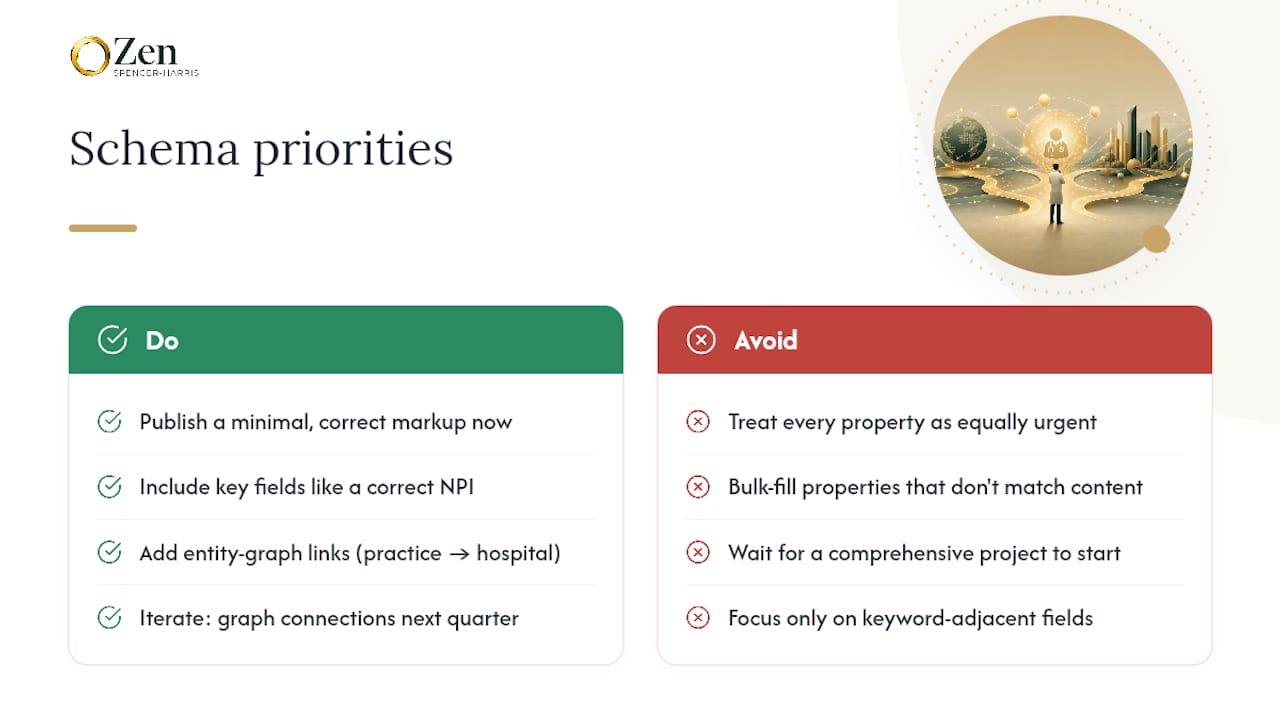
The overlooked lever is hospitalAffiliation and practicesAt linking. Marketers fixate on medicalSpecialty because it feels like the obvious keyword-adjacent field, but the entity graph, physician connected to practice connected to hospital, is what actually helps AI systems and Google's Knowledge Graph disambiguate one Dr. Chen from every other Dr. Chen in the country. That's not a nice-to-have layer for later. It's the difference between a page that ranks and an entity that gets cited.
Where I'd push back on convention: don't wait for a "comprehensive markup project" before shipping anything. Ship the floor this week. Add the graph connections next quarter. Momentum here beats perfection every time.
— Zen
A Managed Path to Physician Schema at Scale
Building this out across a fifteen-physician practice, or a hundred-location health system, is a different problem than one bio page. Zensweb's performance-based model means you pay for delivered visibility gains and booked appointments, not billable hours spent debugging nested JSON-LD.

Practices with lean web teams and a growing physician roster tend to benefit most from a managed partner: someone tracking NPI accuracy, specialty tagging, and hospital affiliation links across dozens of pages while your team focuses on patient care. Practices with strong in-house engineering can absolutely handle implementation themselves using the examples above; where Zensweb adds the most value is the ongoing monitoring, the quarterly validation checks, and connecting that structured data work to actual visibility gains on ChatGPT, Claude, Perplexity, and Google. If you're weighing whether to build this in-house or hand it off, Zensweb's AI visibility program is worth a look before you commit engineering hours to a multi-quarter schema rollout.