

MedicalOrganization schema is a structured data type from Schema.org that tells search engines and AI platforms exactly who a healthcare entity is, what it offers, and where it operates. Use it on your brand homepage, individual location pages, and system-level pages to power richer search listings and clearer AI-generated answers. This guide covers the properties that actually matter, ready-to-use JSON-LD code, and a testing checklist you can run before anything goes live.
TL;DR:
- Using the correct entity type depends on the page’s purpose: Hospital for facilities, MedicalClinic for outpatient centers, and Physician for individual providers.
- Prioritize properties like name, URL, address, telephone, geo, and opening hours for local search visibility and map placement.
- Adding
isAcceptingNewPatientsis a low-cost, high-impact property that influences patient queries and should be implemented first if resources are limited.- Validate structured data with Google’s Rich Results Test and schema.org's validator, focusing on address completeness and correct type labels.
- Never include protected health information in public schema markup and always maintain centralized, well-tested entity definitions for accuracy and easy updates.
Table of Contents
- Medical Organization Schema: Scope and When to Use Each Subtype
- Which Properties Should You Implement First?
- Copy-Paste JSON-LD Examples for Common Pages
- How Do You Test and Validate Your Structured Data?
- Best Practices and Common Pitfalls to Avoid
- Modeling Relationships to Build a Simple Knowledge Graph
- A Quick Note on Privacy and Appropriate Scope
- Why Schema Is a Measurement Problem, Not Just a Markup Problem
- Get Schema Implementation Tied to Booked Appointments
- Canonical Documentation and Validator Links Worth Bookmarking
- Sources
Medical Organization Schema: Scope and When to Use Each Subtype
MedicalOrganization sits inside a clear inheritance chain: Organization → MedicalOrganization → subtypes like Hospital, MedicalClinic, and Physician. Each level adds specificity. Organization gives you generic business properties. MedicalOrganization adds healthcare context like medicalSpecialty and isAcceptingNewPatients. The subtypes layer on their own rules, particularly around location.
Hospital is a special case worth understanding early. It inherits from both Place and MedicalOrganization, which means it needs the location fields a Place requires (address, geo coordinates, opening hours) alongside the medical fields a healthcare entity needs (available services, accepted insurance, specialty). Skip either half and your markup will validate with warnings, even if it doesn't throw hard errors.
Deciding which type to use comes down to what the page represents, not what sounds most impressive:
- Generic MedicalOrganization fits a health system's corporate site or a page representing an umbrella brand with no single physical location.
- Hospital fits a page for an actual inpatient facility with an address and operating hours.
- MedicalClinic fits outpatient locations, urgent care centers, and specialty clinics.
- Physician fits an individual provider's bio or profile page, distinct from the practice that employs them.
Where you place the markup in your site architecture matters as much as which type you pick. The brand homepage typically carries the parent MedicalOrganization entity. Each location page carries its own Hospital or MedicalClinic markup, linked back to the parent. Provider profile pages carry Physician markup, linked to whichever location or department they work in. Getting this hierarchy right up front saves you from a messy retrofit later, especially once you're running dozens of location pages across a multi-site system.
Which Properties Should You Implement First?
Not every property in the MedicalOrganization spec deserves equal attention. Some move search visibility directly. Others are nice-to-haves that mostly matter for large systems with the engineering bandwidth to maintain them. If you're working with limited developer time, start with the properties that touch discovery and trust signals directly, then expand.
The contact and location basics come first because almost every rich result depends on them. name, url, a complete PostalAddress, telephone, geo, and openingHoursSpecification form the backbone that lets Google and AI crawlers place your organization on a map and match it to local queries.
Medical-specific properties come next. medicalSpecialty tells search engines what kind of care you provide, which directly affects whether you surface for specialty-specific queries. isAcceptingNewPatients is a boolean that can influence whether your listing appears for "accepting new patients" searches, a query pattern that spikes constantly in healthcare search behavior. availableService and healthPlanNetworkId round out the picture by clarifying what you do and which insurance networks recognize you.
Authority signals matter most for multi-location systems and hospitals. parentOrganization and sameAs (linking to your verified social profiles and Wikipedia entry, if one exists) build entity trust. aggregateRating surfaces review scores directly in search results when implemented correctly. Larger institutions can also expose healthcareReportingData, a property built for transparency reporting that strengthens institutional credibility when the underlying dataset is real and well sourced.
| Property tier | Examples | Primary impact |
|---|---|---|
| Contact and place | name, url, PostalAddress, telephone, geo | Local search matching, map placement |
| Medical-specific | medicalSpecialty, isAcceptingNewPatients, availableService | Specialty and intent matching |
| Authority signals | parentOrganization, sameAs, aggregateRating, healthcareReportingData | Entity trust, institutional credibility |
Pro Tip: If you can only tackle one property this quarter, make it isAcceptingNewPatients. It's cheap to implement, it changes weekly at most, and it directly answers one of the highest-intent queries a prospective patient can type.
Copy-Paste JSON-LD Examples for Common Pages
Below are three working patterns you can adapt directly. Swap in your own values, and pay close attention to the @id fields. Reusing a stable @id across pages is what lets search engines understand that the entity on your homepage and the entity on your location page are the same organization, not two coincidentally similar ones.
A MedicalClinic location page:
{
  "@context": "https://schema.org",
  "@type": "MedicalClinic",
  "@id": "https://example.com/#downtown-clinic",
  "name": "Example Downtown Family Clinic",
  "url": "https://example.com/locations/downtown",
  "telephone": "+1-555-010-2000",
  "address": {
    "@type": "PostalAddress",
    "streetAddress": "120 Main Street",
    "addressLocality": "Springfield",
    "addressRegion": "IL",
    "postalCode": "62701",
    "addressCountry": "US"
  },
  "medicalSpecialty": "FamilyPractice",
  "isAcceptingNewPatients": true,
  "parentOrganization": {
    "@id": "https://example.com/#health-system"
  }
}
A Hospital page showing available services and institutional reporting data:
{
  "@context": "https://schema.org",
  "@type": "Hospital",
  "@id": "https://example.com/#main-hospital",
  "name": "Example Regional Medical Center",
  "address": {
    "@type": "PostalAddress",
    "streetAddress": "500 Health Parkway",
    "addressLocality": "Springfield",
    "addressRegion": "IL",
    "postalCode": "62702",
    "addressCountry": "US"
  },
  "availableService": [
    { "@type": "MedicalProcedure", "name": "Cardiac Catheterization" },
    { "@type": "MedicalTest", "name": "MRI Imaging" }
  ],
  "healthcareReportingData": "https://example.com/transparency/quality-report",
  "parentOrganization": {
    "@id": "https://example.com/#health-system"
  }
}
An organization-level entity tying everything together:
{
  "@context": "https://schema.org",
  "@type": "MedicalOrganization",
  "@id": "https://example.com/#health-system",
  "name": "Example Health System",
  "url": "https://example.com",
  "subOrganization": [
    { "@id": "https://example.com/#downtown-clinic" },
    { "@id": "https://example.com/#main-hospital" }
  ]
}
Localize the address, phone format, and specialty terms for your actual market, but keep the @id structure identical across environments. If you're staging content before launch, use the production URL in @id from day one. Changing it later breaks the relationship graph you just built, and you'll be untangling duplicate entities in Search Console for weeks.
How Do You Test and Validate Your Structured Data?
Run every snippet through two tools before it touches production: Google's Rich Results Test and validator.schema.org. They catch different problems. Rich Results Test tells you whether Google recognizes your markup as eligible for a specific rich result. The schema validator checks pure spec compliance, which matters because not everything that's spec-valid is rich-result-eligible, and vice versa.
Work through this sequence for every new or updated page:
- Paste the rendered HTML (not just the source) into Rich Results Test to catch anything stripped by JavaScript rendering.
- Cross-check the same markup in the schema validator for type and property errors.
- Confirm every
PostalAddresshas street, locality, region, postal code, and country. Partial addresses are the single most common warning. - Verify
@typevalues are spelled and cased exactly as Schema.org defines them. "medicalclinic" and "Medical Clinic" are not the same as "MedicalClinic." - Check that every
@idyou reference elsewhere on the site actually resolves to a matching entity. - Confirm required fields for your target rich result are present. Missing
isAcceptingNewPatientswon't break validation, but it will exclude you from listings that filter by that field.
Once markup is live, Google Search Console's Enhancements reports track impressions and flag new errors as Google recrawls your pages. Set a recurring monthly check. Structured data errors have a habit of appearing quietly after a template update nobody flagged as schema-related.
Best Practices and Common Pitfalls to Avoid
The single most consequential mistake in medical structured data is including anything that resembles protected health information. Schema.org's own documentation is explicit that this markup is built for web discovery, not clinical data exchange. That means no appointment-level details, no individual patient references, and no clinical notes, ever, in public JSON-LD. If a workflow genuinely needs patient-specific data, that belongs behind an authenticated API, not in a <script type="application/ld+json"> tag sitting in your page source for anyone to view.
Beyond that core rule, a few practical habits separate maintainable implementations from ones that quietly rot:
- Centralize each entity's definition in one canonical source (a CMS component or shared include) and reference it by
@ideverywhere else, rather than hand-copying JSON-LD onto every page. - Use explicit relationship properties like
parentOrganizationandsubOrganizationinstead of relying on prose mentions of "part of X health system" that crawlers have to infer. - Treat schema like code: test it in staging first, roll it out with monitoring in place, and add automated validation to your CI/CD pipeline so a broken template can't ship silently.
- Audit existing markup quarterly. Address changes, provider departures, and rebrands all leave stale structured data behind if nobody owns the update process.
Pro Tip: Assign one person, not a rotating cast of contractors, as the owner of your schema strategy. Structured data degrades fastest when responsibility for it is unclear, because nobody notices when it breaks.
Modeling Relationships to Build a Simple Knowledge Graph
Real value shows up when you stop tagging pages in isolation and start modeling how entities connect. Use parentOrganization and subOrganization to reflect your actual legal and operational hierarchy, not an idealized org chart. If a clinic operates independently for billing purposes but shares a brand, model that distinction rather than flattening it for convenience.

Service modeling deserves the same care. Instead of listing services as plain text, link availableService entries to MedicalProcedure, MedicalTest, or MedicalTherapy types, as Schema.org's Hospital documentation recommends. This gives crawlers a structured way to match specific procedures to specific locations, rather than guessing from unstructured page copy.
Controlled vocabulary codes like MeSH, SNOMED, or ICD add precision, but they're not for every site. Add them when you have accurate mappings and a process to keep them current. Skip them if you're guessing at codes, because a wrong code is worse than no code. Richer modeling always trades off against upkeep: the more relationships you encode, the more you commit to maintaining when services or affiliations change.
A Quick Note on Privacy and Appropriate Scope
Schema.org markup exists for public-facing metadata, full stop. It was never designed to carry clinical records or anything patient-identifiable, and treating it that way creates real exposure. If a feature genuinely requires patient data, that data belongs inside an authenticated API or your practice management system, never in a public JSON-LD block that any browser can read with view source. Before you publish or update any page, do one final pass: scan both the visible content and the markup itself for anything that could identify a specific patient, and remove it.
Why Schema Is a Measurement Problem, Not Just a Markup Problem
Most healthcare teams treat structured data as a checkbox: add the JSON-LD, move on. That misses the point. Consistent entity modeling across sameAs, parentOrganization, and medicalSpecialty doesn't just help traditional search. It's increasingly how AI platforms decide which practices to cite when answering a patient's question about specialists in their area.
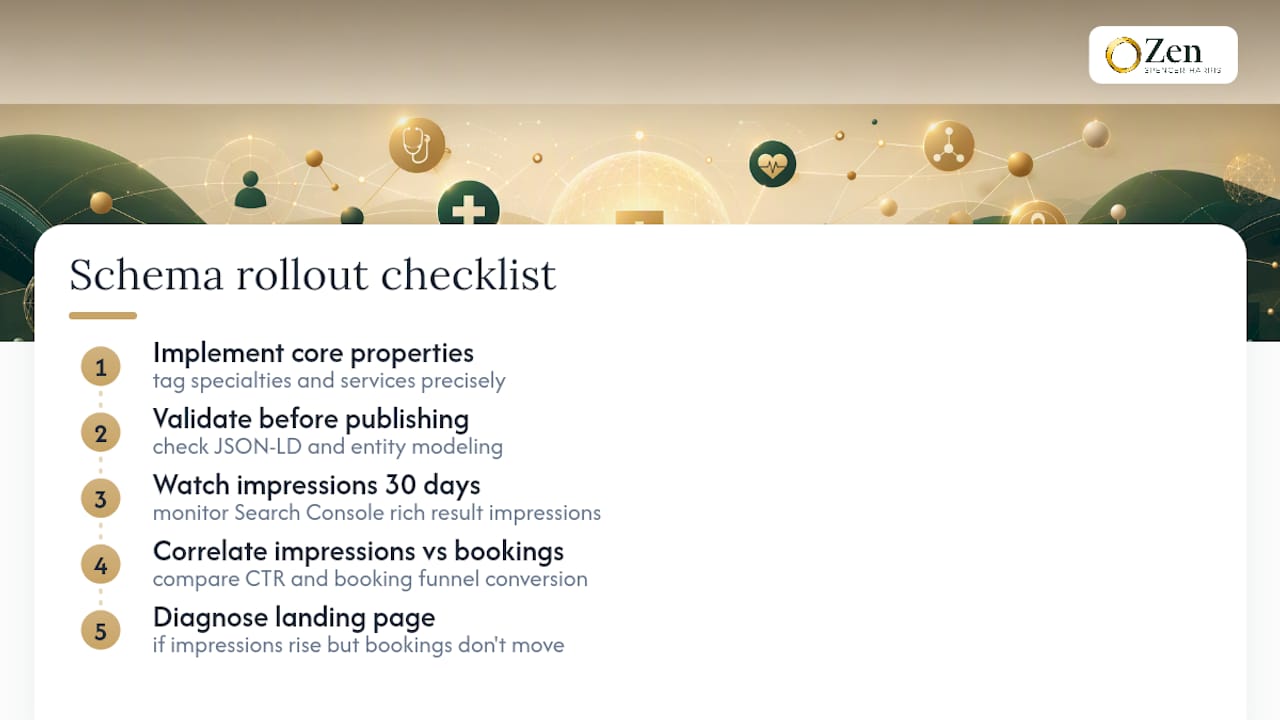
Tag your specialties and services precisely, and track what happens next: rich result impressions in Search Console, click-through rate against your pre-markup baseline, and, most importantly, whether those extra clicks convert into booked appointments. Visibility that doesn't translate into bookings is a vanity metric.
A practical rollout checklist: implement core properties first, validate before publishing, watch Search Console impressions for 30 days, then correlate impression gains against your booking funnel. If impressions rise but bookings don't move, the problem usually sits downstream of the schema, most often on the landing page itself.
— Zen
Get Schema Implementation Tied to Booked Appointments
Structured data only earns its keep when it moves a real number: booked appointments, not just impressions. Zensweb builds MedicalOrganization and subtype markup as part of a performance program that also covers AI Share of Voice, the work that gets your practice cited by name when patients ask ChatGPT, Claude, or Perplexity who treats their condition nearby.
That combination matters because schema alone tells search engines who you are. Pairing it with AI visibility work and local SEO, including Google Business Profile alignment, makes sure that identity actually surfaces where patients are searching now. Zensweb's model is performance-based: you pay for delivered results, not hours logged. Start with a free healthcare audit to see exactly where your current markup, or lack of it, is costing you visibility, and check the services overview to see how implementation fits into a broader patient acquisition plan.
Canonical Documentation and Validator Links Worth Bookmarking
- MedicalOrganization type page and its subtype pages, including Hospital
- Google's schema documentation for medical types and usage examples
- Health and medical types documentation covering scope and intended use
- Rich Results Test and validator.schema.org for pre-publish validation